| Plan:  | Until:  |
🔔
No notifications
| Account ✕ Log out

Rotation bot for World of Warcraft

Defiller is a bundle of an addon and a launcher for WoW Legion 7.3.5: the addon calculates the rotation and shows what to press, the launcher presses the keys and switches targets. Build profiles, take ready-made rotations from the library, play PvP and PvE.

▶ Download Launcher
🎁

Try it free — 7 days of full access

Activate the promo code when ordering the "7 days" plan on the payment page and get every Defiller feature.

promo code
5116FA10 📋
Copied!

How it works

The addon calculates the rotation and shows the required ability. The launcher reads the hint and presses the key. The split matters: only the desktop program performs key presses.
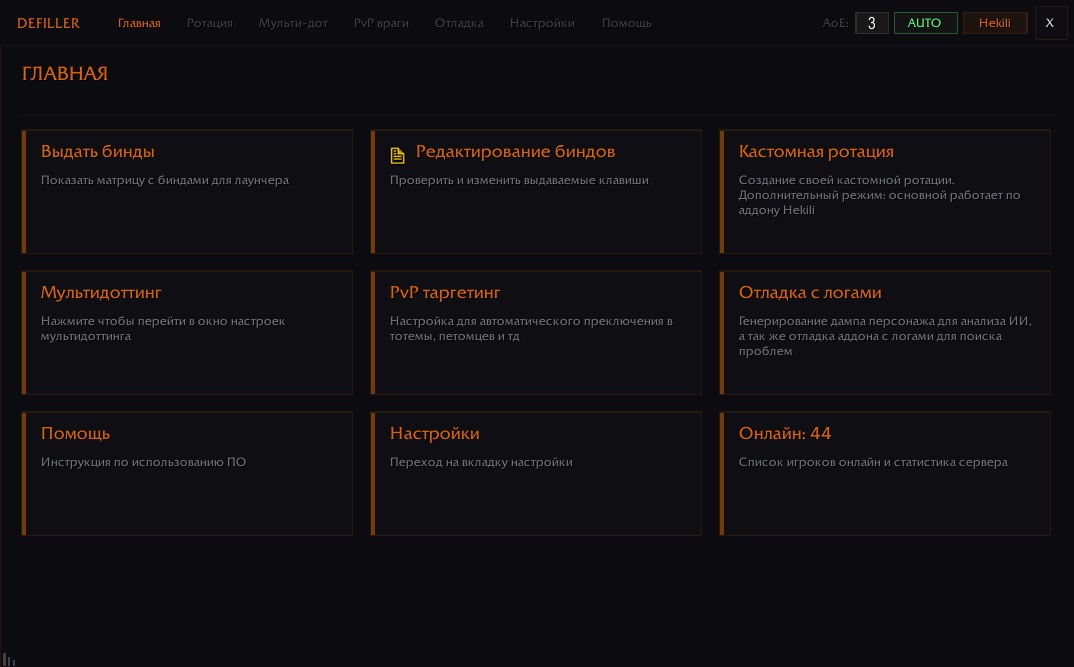
Defiller addon menu in game: rotation settings and next ability indicator
Step 1 — the addon shows what to press
01

Addon calculates the rotation

Inside the game the addon tracks cooldowns, resources, buffs and debuffs on the target and decides which ability comes next according to your profile priorities. It only shows it — the addon itself never presses anything.
Rotation calculation Cooldowns and resources Buffs and debuffs 12 classes WoW Legion 7.3.5
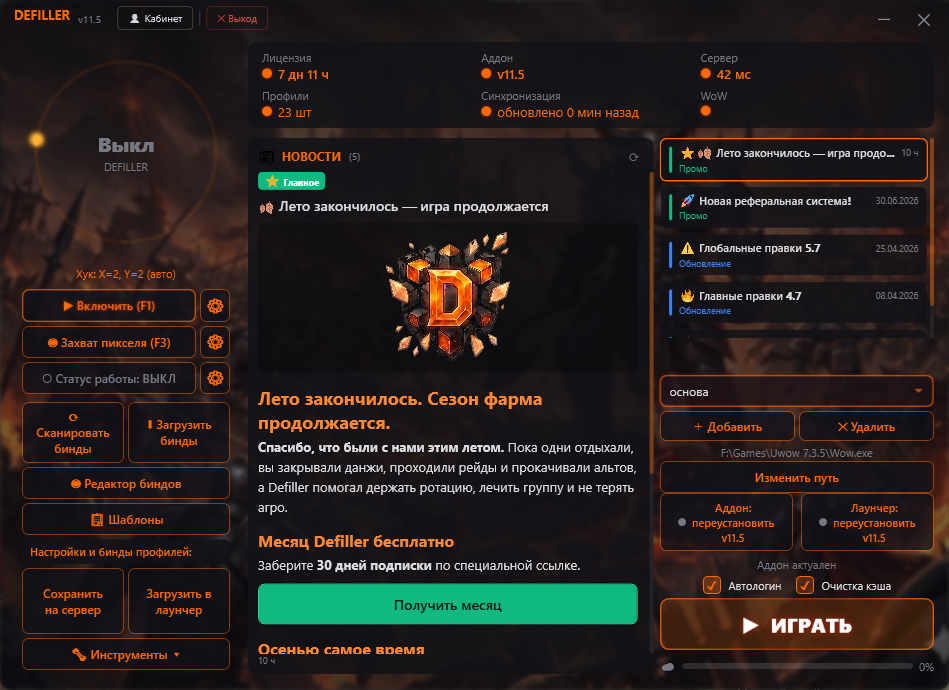
Defiller launcher window with profiles and cloud sync
Step 2 — the launcher presses the key
02

Launcher presses and switches targets

The launcher reads the addon hint and presses the required key itself according to your binds, switches targets and keeps the rotation automation running while the hotkey is enabled. It also holds profiles, the bind editor, auto-update and cloud sync.

Key presses by binds Target switching Profiles and binds Cloud Auto-update

🛡️ Game files are not modified

The addon lives in Interface/AddOns plain Lua files, the launcher is a separate program next to the game. The client is not patched, the exe is not modified, nothing is written into process memory: file integrity checks find no changes, because there are none.

Delete the addon folder and the game state is back to original. The administration learns about usage only if the player tells them.

📚 Rotation library

Build the best — get more back

Defiller grows thanks to the community. Publish your rotations, let other players test them in combat — and get a personal promo code with a discount of up to 100% for your next plan.

1
✍️

Build a rotation

Create a profile for your class in the visual editor and add it to the library. A detailed description helps others get started faster.

2
⚔️

Fights and ratings

Other players test the template in real conditions and rate it. Every download and every star — is a step towards the bonus.

3
🎁

Claim your reward

A promo code appears in your account — activate it at checkout at any time. The higher the rating and the downloads — the bigger the discount.

Get a 100% discount!
🏆Build efficient setups🏆
🏆Share your IMBA builds🏆

Features

Rotation automation

The addon calculates priorities and cooldowns, the launcher presses the required key

📝

Profile builder

Visual rotation editor with template export and import

☁️

Cloud sync

Settings are stored on the server and loaded on sign-in

🎯

Multi-target

The launcher switches targets, the rotation keeps dots on each one

📊

Analytics

Statistics of pressed abilities and bot activity

🛡️

Game files stay untouched

The addon is plain Lua files, the launcher runs separately from the client

🌐

Community

Share templates, rate other people's work, author ratings

🔧

Support

Regular updates and responsive technical support

Pricing plans

Loading pricing...

Download Launcher

The Defiller launcher installs the addon and all required components, configures binds and updates the bot to the current version.

⬇️ Download DefillerLauncher.exe

Version: ... | Windows 7/8/10/11

FAQ

Which part does what: the addon or the launcher?
Two parts share the work. The addon inside the game calculates the rotation by your profile priorities and shows which ability to press now. The desktop launcher reads that hint and presses the key according to your binds, and also switches targets. The addon itself never presses anything.
Are game files modified?
No. The addon is plain Lua files in Interface/AddOns, the launcher is a separate program next to the game. The client is not patched, the exe is not modified, nothing is written into process memory. Removing the addon folder returns the game to its original state.
Which classes are supported?
Currently all WoW Legion 7.3.5 classes are supported. For every class there are ready-made rotation templates for all specializations, which you can tune to your own playstyle.
How does cloud sync work?
All your settings, profiles and templates are saved to the server automatically when changed. When you sign in from any device, all data is loaded automatically.
Can I create my own template?
Yes! The built-in visual editor lets you create and tune rotations for any class. You can share your template with the community or keep it for personal use.
What if something does not work?
Our support team is ready to help with any question. Write to support@defiller.ru or create a ticket in your account for a fast response.

Support

📧

Email

Send us an email

support@defiller.ru
💬

Ticket system

Create a request in your account

Create a ticket
📚

Documentation

Guides and instructions

Open documentation